Summer 5x7 Card Mockup: A Designer's Guide to Beach Invitations
There’s a specific challenge in digital design that every creative faces: how do you present a flat, two-dimensional idea in a way that feels tangible and real? When you’ve poured hours into crafting a wedding invitation or a baby shower announcement, showing it off on a plain white background feels like a missed opportunity. You need context. You need texture. This is where a high-quality mockup transforms from a nice-to-have into an essential part of your workflow, particularly for seasonal projects like a Summer 5x7 Card Mockup designed for beach invitations.
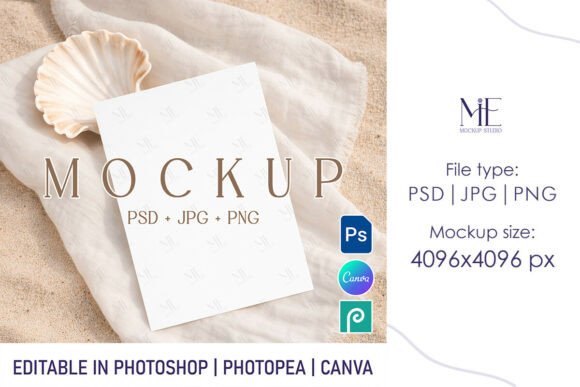
Imagine the final product. A client wants a destination wedding invite, or perhaps you’re launching a boho-themed product line. They need to visualize the card resting on a sandy surface, flanked by seashells and dried palm leaves, or held gently in a hand against a backdrop of a hazy sunset. A generic template won't capture that atmosphere. A specialized mockup, however, bridges the gap between your digital canvas and the physical world, allowing you to sell the feeling of summer before the event even happens.
The Anatomy of a Realistic Beach Invitation
When selecting a Summer 5x7 Card Mockup, the visual storytelling details are what separate amateur presentations from professional branding. The "personality" of a beach-themed mockup lies in its lighting and composition. You aren't just looking for a picture of the ocean; you are looking for the way sunlight interacts with paper. Does the mockup feature soft, diffused morning light, or the golden hour glow of a late afternoon? These subtle shifts in lighting change how your typography and color palette are perceived.
For designers working with boho wedding aesthetics or rustic baby shower invite designs, the surrounding elements act as supporting characters. A well-crafted mockup might include natural props like twine, driftwood, or tropical foliage. These elements shouldn't distract from your design; they should frame it. The goal is to create a scene that feels curated, not cluttered. When a potential client looks at your presentation, they should immediately understand the vibe of their event—whether it’s relaxed and casual or elegant and upscale.
Streamlining Workflow with Smart Objects
Time is a non-renewable resource for freelancers and agency designers alike. The true value of a digital asset lies in its usability. This is where the technical side of a Summer 5x7 Card Mockup becomes a game-changer. The inclusion of Smart Object layers in PSD files is the industry standard for a reason. It allows you to insert your artwork—be it a script font headline or intricate vector graphics—without manually warping, skewing, or adjusting perspective.
The process is designed to be frictionless. You open the file, locate the designated layer, and paste your design. The software automatically applies the correct lighting, shadows, and texture of the paper to your artwork. This ensures that your brand identity remains consistent. If you are presenting a suite of design assets to a client, you can swap out designs in seconds. This flexibility allows you to create multiple variations of a beach invitation to show different color schemes or layout options, giving your client a comprehensive view of their options.
Strategic Applications for Modern Creatives
While the immediate use case is clear—showcasing an invitation—the utility of a Summer 5x7 Card Mockup extends far beyond weddings and showers. For small business owners and marketers, this template is a versatile tool for seasonal campaigns.
Consider a boutique hotel or a travel agency. They can use this mockup to display a "Welcome" card or a promotional offer for summer packages. The 5x7 aspect ratio is a standard for direct mail marketing, making it perfect for print design previews. Content creators and bloggers can also leverage these templates for social media graphics. A high-resolution image of a stylish card on a beach background makes for an engaging Instagram post or a Pinterest pin that drives traffic to a website.
Furthermore, the file formats included—PSD, JPG, and PNG—cater to different levels of technical expertise. If you are a crafter or hobbyist who doesn't own Adobe Photoshop, the ability to edit the PNG file in Canva democratizes the design process. It ensures that high-end visual presentation isn't restricted only to those with expensive software subscriptions.
Choosing the Right Aesthetic for Your Project
Not all beach themes are created equal. When evaluating a Summer 5x7 Card Mockup, consider the specific sub-genre of "summer" you are trying to convey. A mockup featuring bright, tropical flowers and turquoise water suits a luau or a destination wedding. Conversely, a mockup with neutral tones, dried grass, and a matte paper texture is better suited for a boho wedding or a minimalist baby shower invite.
Think about the font pairing in your design. If your primary typeface is a bold display font or a flowing handwritten font, you need a background that doesn't compete for attention. A simple, textural background like linen or light sand allows your typography to stand out. If your design uses a clean sans serif font or a classic serif font, you have more freedom to use a busier background, provided the composition is balanced.
Ultimately, the goal is to build trust. When you present your work using a realistic, professional mockup, you demonstrate that you understand the end product. You aren't just selling a digital file; you are selling a physical object that will exist in the real world. By using a Summer 5x7 Card Mockup, you help your audience visualize that reality, making it much easier for them to commit to your creative vision.