iPhone 16 Tough Case Mockup: Elevate Your Phone Case Designs
The Ultimate Tool for Realistic Device Presentation
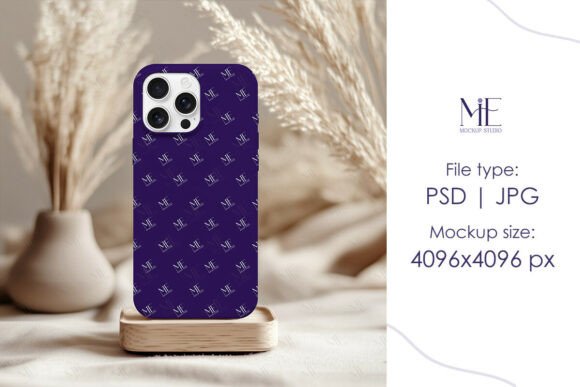
When you’re finalizing a design for a physical product like a phone case, seeing it in a realistic context makes all the difference. This iPhone 16 Tough Case Mockup is designed specifically for creators who need to visualize their artwork on the latest device model. It’s not just a static image; it’s a dynamic tool built with Smart Object layers in Photoshop, allowing you to place your design seamlessly onto the 3D-rendered surface of an iPhone 16. The mockup captures the tactile quality of a tough case—the slightly raised edges, the matte or glossy finish options, and the precise cutouts for the camera and buttons. This level of detail helps you communicate the true look and feel of your final product to clients, customers, or your own audience.
Where This Mockup Truly Shines
This iPhone Case Mockup is versatile across numerous projects. For designers running an online store, it’s perfect for creating product listings that look professional and consistent. Entrepreneurs can use it to generate social media content that stops the scroll—imagine showcasing your new pattern collection on a sleek phone case against a curated background. Marketers and bloggers can integrate it into lifestyle imagery for articles about tech accessories or gift guides. Even hobbyists selling on platforms like Etsy or Redbubble will find it invaluable for presenting their artwork without the cost of photographing physical samples. The high-resolution 4096x4096 JPG output ensures your images look sharp on websites, in print catalogs, and across digital ads.
Beyond commerce, this mockup serves branding and editorial projects. If you’re designing a brand identity for a tech-related client, you can demonstrate how their logo or pattern translates onto a physical product. Publishers creating content about mobile accessories or digital lifestyle can use these assets to illustrate articles with clarity. The Boho Smartphone Mockup aesthetic in this file leans toward clean, modern styling, making it suitable for minimalist, elegant, or trendy design themes. It helps maintain visual consistency across your portfolio or marketing materials, reinforcing a professional standard that builds audience trust.
Practical Guidance for Effective Use
Getting started is straightforward, but a few practical steps will ensure you get the most out of this asset. After downloading the PSD file, open it in Photoshop and locate the Smart Object layer—it’s clearly labeled for easy access. Double-clicking this layer opens a new window where you paste your design. Save it, return to the main file, and your artwork automatically conforms to the case’s perspective, lighting, and shadows. This process takes minutes, but the result is a polished presentation that can significantly influence a customer’s perception of quality.
Consider how your design interacts with the mockup’s physical characteristics. The iPhone 16 Tough Case has specific dimensions and contours; patterns with fine details or text should be tested for readability at actual size. Use the mockup to evaluate color contrast against the case’s background—does your artwork pop, or does it get lost? For brand identity work, this is where you assess consistency. Does the logo placement feel balanced? Does the color palette align with the broader brand system you’re developing?
When pairing this mockup with other design assets, think about context. If you’re creating a social media campaign, combine it with complementary lifestyle images or typography that matches your brand voice. For packaging design presentations, you might place the phone case mockup alongside other product visuals to tell a cohesive story. The key is to use this tool not just as a display, but as a part of your design and communication strategy. It helps bridge the gap between digital creation and physical product, giving your work tangible credibility.
Remember, this is a digital download with no physical items shipped. The files are ready for immediate use, which means you can iterate quickly—test multiple designs, adjust colors, or experiment with placements without waiting for samples. For small business owners and content creators, this efficiency is invaluable. It allows you to respond to trends, update your product line visuals, or refresh your portfolio with minimal turnaround time.
In summary, the iPhone 16 Tough Case Mockup is more than a template; it’s a professional tool that enhances how you present and sell your designs. Whether you’re a designer refining a client project, an entrepreneur building a product line, or a creator sharing your work with the world, this mockup provides the realism and flexibility needed to make your designs stand out. Use it to save time, maintain quality, and communicate your vision with clarity.