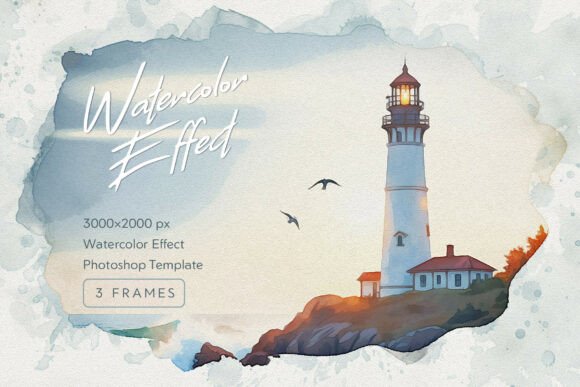
Watercolor Frames Photoshop Effect: A Digital Painter's Touch
There's a distinct, almost magical quality to a watercolor painting. It’s in the way the pigment blooms against wet paper, creating soft, unpredictable edges and delicate, organic textures. For years, achieving that look digitally meant tedious, manual work with brushes and blend modes, often with mixed results. The Watercolor Frames Photoshop Effect changes that. It’s not just a filter; it’s a specialized toolkit that replicates the authentic behavior of watercolor on paper, offering a direct path to transforming your digital photography into a handcrafted work of art.
Understanding the Core Aesthetic
This effect is built around a fundamental concept: the interaction between pigment and paper. The templates provided focus on creating soft, atmospheric borders that frame your subject with an elegant, artistic soul. Think of it as the digital equivalent of a wet-on-dry painting technique. The pigment sits on the surface, spreading slightly and forming those characteristic soft bleeds and textured edges. The result is a frame that doesn’t just sit on top of your image but feels integrated, as if your photo was printed on textured paper and then carefully painted around. The appeal lies in its sophisticated, minimalist aesthetic. It adds a layer of handcrafted charm without overwhelming the subject, making it perfect for projects where a personal, artisanal touch is paramount.
Where This Frame Style Truly Shines
The versatility of the Watercolor Frames Photoshop Effect is one of its greatest strengths. Its ability to evoke emotion and authenticity makes it a powerful design asset across numerous applications. For wedding photographers and stationery designers, it’s invaluable. Imagine a save-the-date card or a wedding album spread where the couple’s portrait is nestled within a soft, watercolor bleed. It instantly elevates the sentiment, adding a timeless, romantic feel that standard digital borders can’t match.
Beyond weddings, it’s a game-changer for branding, especially for small businesses and entrepreneurs in the artisan, wellness, or lifestyle spaces. If you’re a baker showcasing a new line of organic pastries, a potter displaying handmade ceramics, or a florist arranging bouquets, this effect adds a layer of perceived craftsmanship and care to your product photography. It tells a story of quality and attention to detail, which is central to a strong brand identity. For social media managers and bloggers, it creates a cohesive, distinctive feed that stands out. Instead of a generic grid, you can develop a signature style where every featured image feels like a curated piece of art, boosting recognition and audience engagement.
Practical Integration into Your Workflow
What makes this toolkit practical for professionals is its thoughtful construction. Delivered as high-fidelity Photoshop templates at 2000 x 3000 pixels and 300 DPI, it preserves the intricate details you’d expect from a premium design asset—the subtle paper fibers, the faint rings of dried paint, the nuanced texture. The fully editable PSD structure is the real hero here. It utilizes Smart Objects, which means you can apply this effect non-destructively. Your original photograph remains untouched on its own layer. You simply paste your image into the designated Smart Object, save, and watch as it’s instantly enveloped in the realistic watercolor frame. This allows for endless experimentation without compromising your source file.
Choosing the right frame from the three provided options involves considering your project’s mood. One might have a more pronounced, energetic bleed, ideal for dynamic lifestyle shots. Another could offer a subtler, more delicate wash, perfect for serene portraits or minimalist product photos. The key is to test them against your image. Does the frame complement the color palette and composition? Does it guide the viewer’s eye toward the subject or distract from it? The best results come from this kind of evaluative pairing, much like selecting a complementary typeface for a headline.
Design Observations and Recommendations
From a design perspective, this effect works brilliantly when you’re aiming for a specific emotional resonance. It softens the sometimes sterile nature of digital photography, introducing an element of human touch and imperfection that viewers find relatable and engaging. In editorial design or for creating mockups for packaging, it can suggest a product’s handmade qualities. For a photographer’s portfolio website, using these frames on select images can create visual hierarchy, drawing attention to featured work.
A practical recommendation: pay attention to the edges of your subject within the frame. The most convincing integrations often occur where the subject’s natural contours interact with the watercolor bleed. The Smart Object setup makes it easy to adjust the positioning of your photo within the frame to achieve the best possible blend. While it’s a powerful creative font-style tool, remember its purpose is to enhance, not overpower. It pairs exceptionally well with clean, modern typography—think a simple sans serif font for captions or a elegant serif font for titles—to maintain readability and a professional finish.
Ultimately, the Watercolor Frames Photoshop Effect is more than just a set of templates. It’s a bridge between the precision of digital design and the organic beauty of traditional art. It provides a reliable, efficient way to infuse projects with warmth, personality, and a distinct handcrafted quality. Whether you’re refining a brand’s visual language, designing personal stationery, or crafting content that needs to connect on a deeper level, this toolkit offers a sophisticated solution that respects both your creative vision and your workflow.